Orchestration with its own repair crew.
One Windows workspace for Claude Code, Codex, Gemini, local models, and terminal tools. Run them side by side, coordinate their work, and troubleshoot stalled runs without losing context.
- Claude Code · Codex · Gemini
- Ollama · LM Studio, loopback only
- Up to 32 panes a workspace · 5 workers a run
- You approve every plan
The plan, the boundaries, the result.
Three captures from the 0.2.0 preview build, taken by the app's own end-to-end test. The interface is the real application. The workers in the orchestrated run are test stand-ins, not live Claude sessions, which is why each task takes a second and Tokens reads 0.
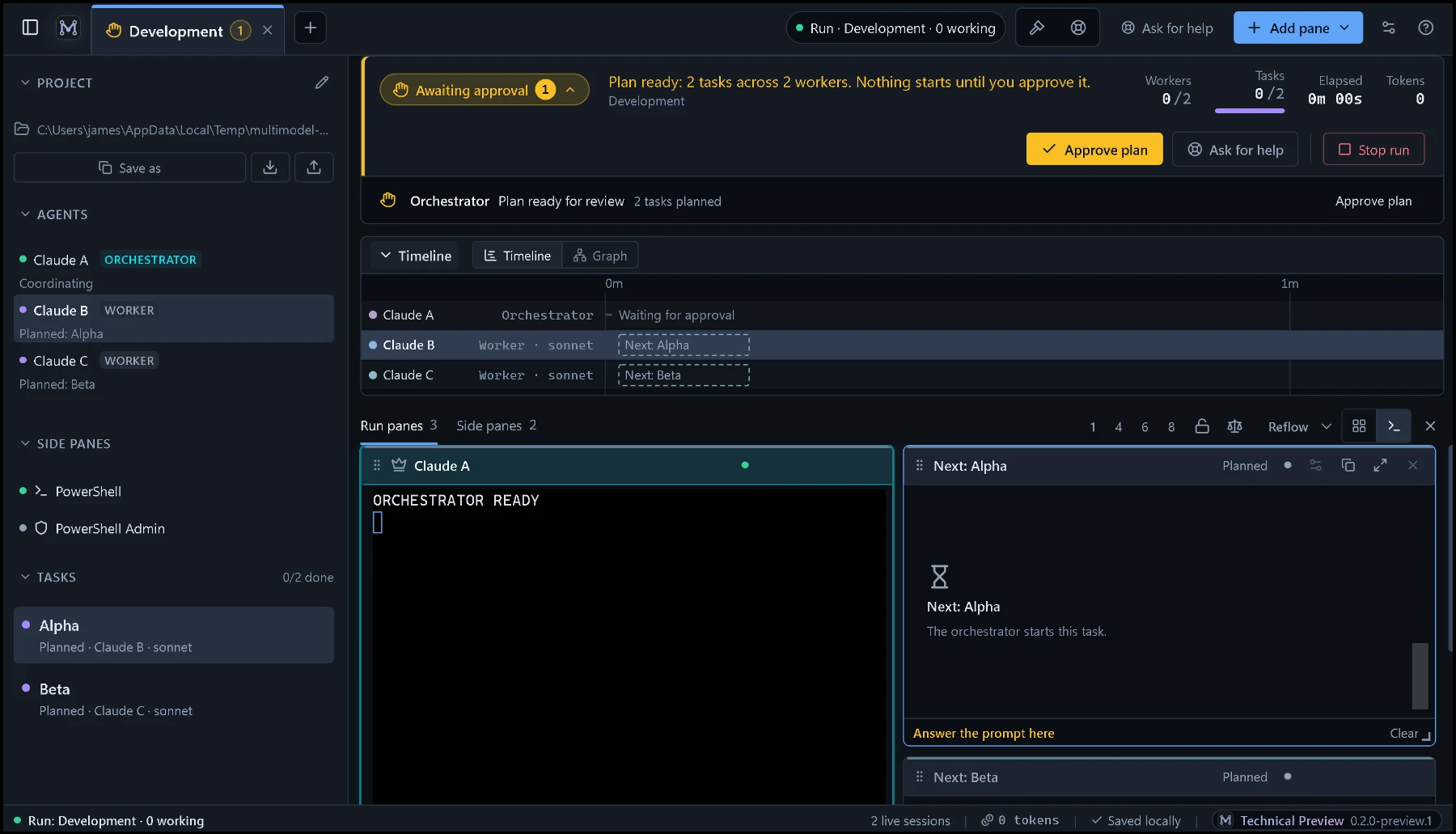
The run stops at the gate
The orchestrator has written a plan and the run header holds at Awaiting approval. Under it, the orchestrator's own line reads Plan ready for review, 2 tasks planned.
Only you can approve
The header says nothing starts until you approve it, and Workers and Tasks both read 0 of 2. The app refuses to dispatch an unapproved plan, rejects a plan that arrives already marked approved, and ties your approval to one exact revision, so a changed plan has to be approved again.
Every task is assigned first
Before anything runs, the timeline shows who gets what: Alpha is next for Claude B and Beta for Claude C. Both are drawn dashed because they are planned, not running.
Planned means not started
The worker pane is held. It shows Next: Alpha with a Planned status and says the orchestrator starts this task. No worker session is running in it yet.
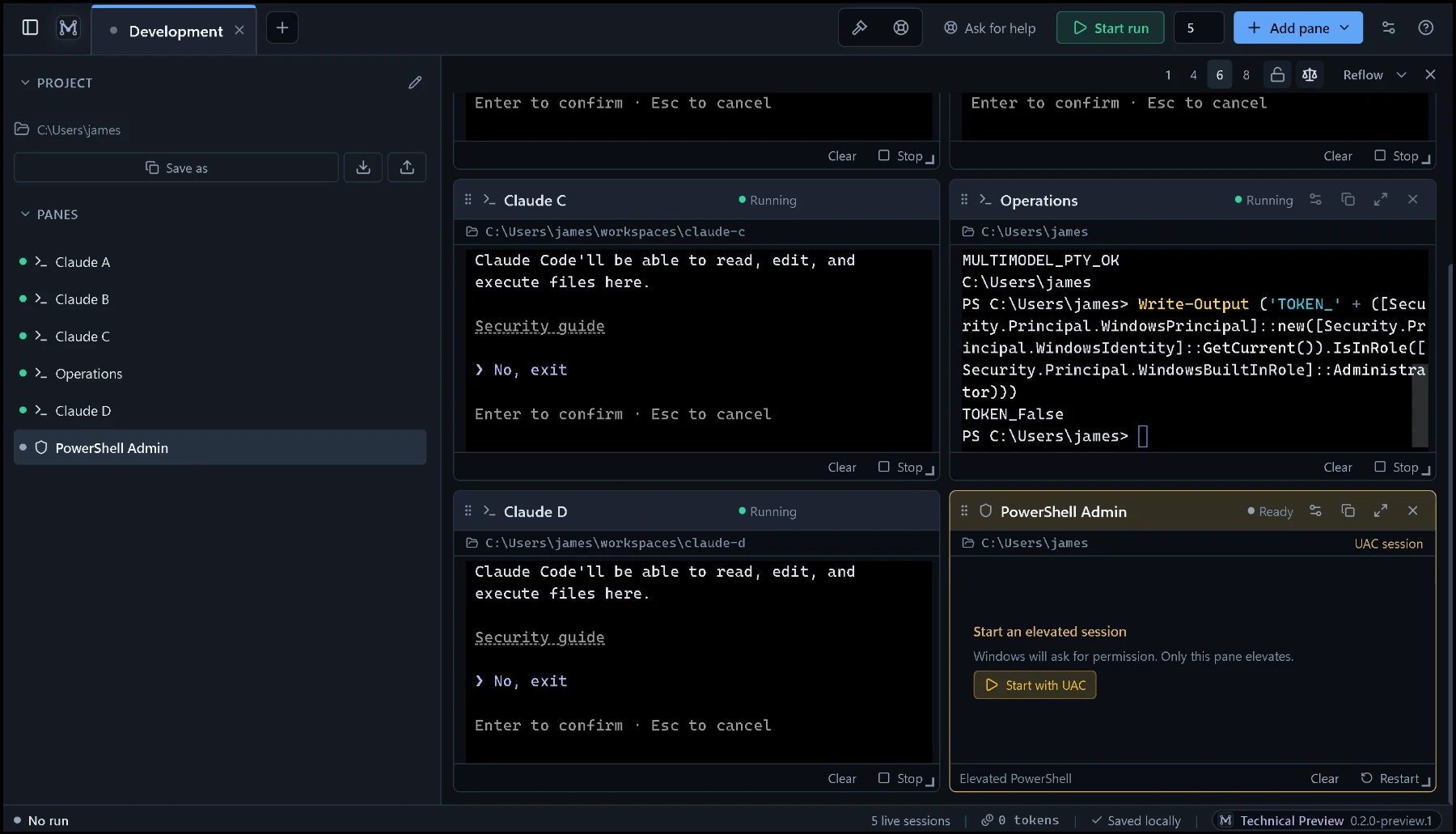
Each pane runs a CLI in its own folder
Claude C is the Claude Code CLI, started in
workspaces\claude-c. What is on screen is Claude Code's own question about trusting that folder, not a MultiModel screen.An ordinary pane is not elevated
This PowerShell pane asks Windows whether its process holds the Administrator role. The answer it prints is
TOKEN_False.Elevation is one pane, on request
The Admin PowerShell pane has not started. It says Windows will ask for permission and that only this pane elevates, and it waits for you to press Start with UAC. MultiModel itself refuses to start as Administrator.
State is saved on this PC
The status bar reads Saved locally beside the build label, Technical Preview 0.2.0-preview.1. Workspaces and layouts are written to
state.jsonin your profile.
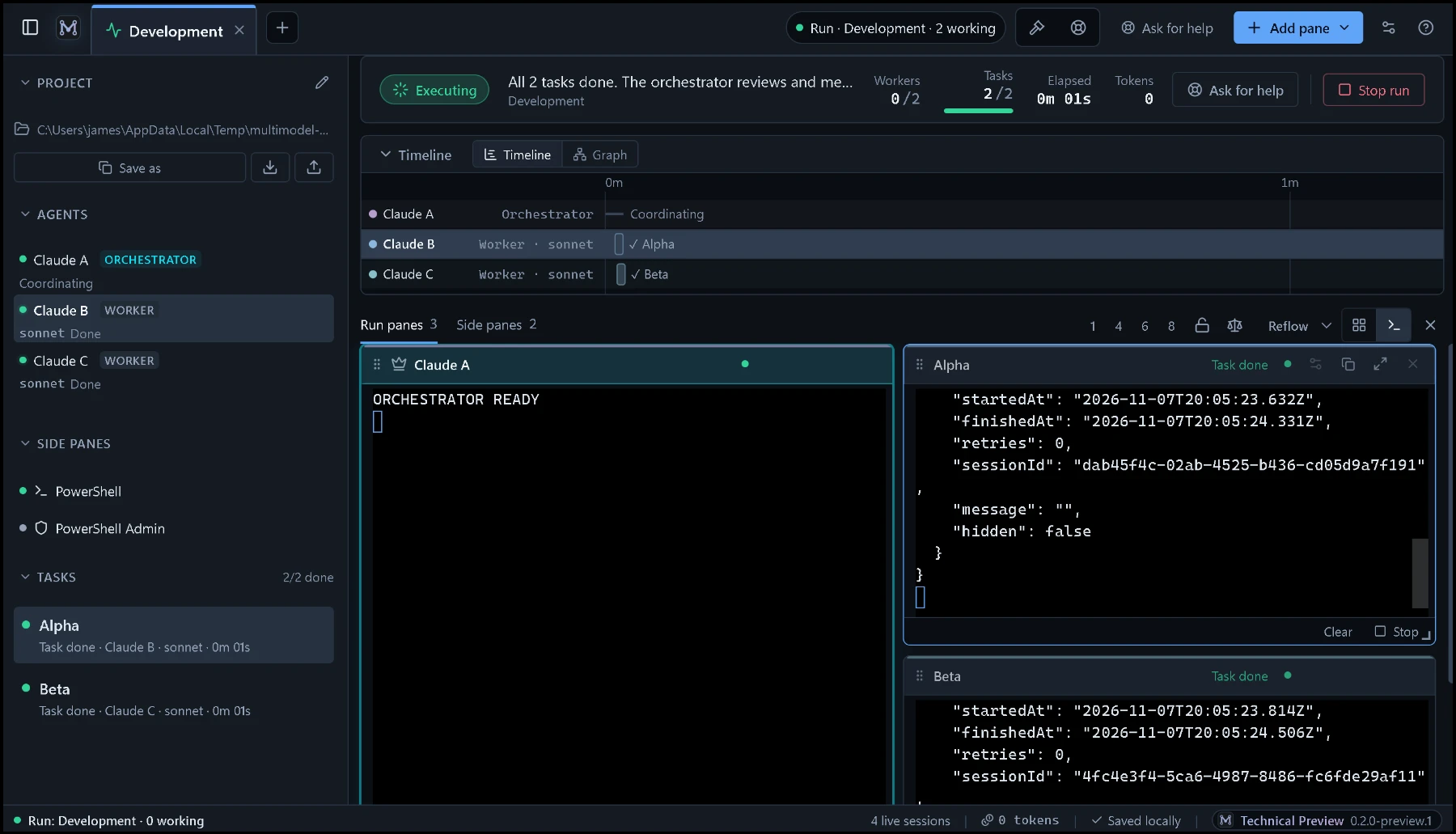
Done is not the same as Completed
The header reports all 2 tasks done while the phase still reads Executing, because the orchestrator's review comes next. A run is recorded as Completed only when every task has a current passing check and a passing review. Otherwise the app refuses, and the run is recorded as Partial.
One lane per agent
Claude A coordinated as the orchestrator. Claude B finished Alpha and Claude C finished Beta, each as a worker set to the sonnet model.
The pane keeps the task record
Alpha's pane is marked Task done and prints the record the app holds for it: start and finish timestamps, a retry count of 0 and the task's own session ID.
The task list agrees
The sidebar counts 2/2 done and names the worker, model and time for each task. The one-second times, like the zero token count, come from the stand-in workers this capture uses.
Something breaks. Sentinel comes out.
The app notices. The task turns failed in the run header and the task list, and Ask for help sits right there. Run errors raise a notice with the same button on it.
You stay in charge. Sentinel diagnoses and recommends; the orchestrator can retry a task up to twice; you press Resume run. It cannot change your project's files.
Two agents outside the room.
- 01
Run the work
The orchestrator writes a plan: up to five tasks, each with its own worker pane, its own git worktree and branch, a model and a time budget. You approve it before anything starts.
- 02
Monitor and detect
The run header counts workers, tasks, elapsed time and tokens, with a timeline per agent. A failed task shows there at once, a run error raises a notice, and Ask for help is on both.
- 03
Repair and retry
Sentinel takes the run's state and the last errors, finds the cause and tells you the fix. The orchestrator can retry a task with feedback, up to twice.
- 04
Keep momentum
Press Resume run. Dispatch continues on the same run, and when it finishes the orchestrator's report is written to a run note you keep.
SentinelAsk for help, and it comes out.
Sentinel starts fresh, on purpose. It is handed the project, the run's state, every task and the last few app errors, works out where the orchestration broke, and explains how to recover while you watch. It is fenced out of your project's files, so it never edits your code.
SovereignA second pair of eyes that can't touch a thing.
Run a fresh UAT pass, a performance check or an accuracy review, or vet a plugin before you add it. Sovereign reads and runs commands, but it is denied every edit, so your project stays exactly as you left it.
WorktreesEvery worker gets its own branch.
Each task runs in its own git worktree, so five workers can change the same repository without touching each other's files. Finished branches are rebased and merged one at a time, in plan order, and a failed task's worktree is left in place for you to inspect.
IntelligenceKnow when a change made it worse.
Intelligence records each run's timeline, duration and token counts, and reruns a saved dataset of test cases after you change a model or prompt. Pick a baseline run and the regression gate checks results, latency, tokens and cost against it. Recording starts off, stays in a local database on this PC and expires after 30 days.
The gridOr skip orchestration entirely.
Use MultiModel as a cockpit: many Claude windows, each on its own project, in one resizable grid. PowerShell, WSL, Git Bash and Codex sit beside them. Save the layout and pick up tomorrow.
LocalThe app adds no cloud of its own.
Terminals are real local processes, and MultiModel has no account and no telemetry. Claude Code, Codex and Gemini still talk to their own services, exactly as they would in a plain terminal. Local model panes talk only to Ollama or LM Studio on loopback, and your settings live in one JSON file in your profile.
Pay for the orchestration. Keep what you paid for.
- Up to 32 panes in a workspace, saved layouts
- Claude Code, Codex, Gemini, PowerShell, WSL
- Local models through Ollama or LM Studio
- Everything in Grid
- Orchestrate runs across agents
- A git worktree and branch for every worker
- Sentinel run diagnosis, Sovereign review
- Intelligence: run history, test datasets, regression gate
- Every patch and upgrade
- Email support from the developer
- 5 seats or more
- Volume pricing, one invoice
- Onboarding call
- Priority on patches
Get MultiModel for Windows.
It installs from the Microsoft Store and stays up to date on its own. Nothing to sign in to: MultiModel starts the Claude Code, Codex or Gemini CLI you already have.

Windows
Windows 10 version 1903 (build 18362) or later, or Windows 11. 64-bit only; the terminals use Windows ConPTY. About 170 MB to download, around 400 MB on disk. MultiModel refuses to start as Administrator and runs as a normal user.
Agents you bring
Claude Code, Codex and Gemini are optional CLIs on your PATH, installed and signed in by you. WSL and Git for Windows are optional too. A pane whose CLI is missing says so instead of failing quietly.
Local models
Ollama (port 11434) or LM Studio (port 1234), reached only on loopback with redirects disabled. No model ships with the app. MultiModel itself calls no cloud model; Claude Code, Codex and Gemini reach their own services from the panes you start.
Where things live
One file,
%APPDATA%\multimodel\state.json, holds your workspaces, layouts and profiles. It never contains terminal output, transcripts or secrets. API keys you choose to store are encrypted with Windows data protection. It survives uninstall. Intelligence traces, if you turn recording on, go tointelligence.sqlitein the same folder and expire after 30 days.Privacy and security
No account and no telemetry. The window cannot touch the filesystem, spawn processes or reach the network directly; every capability is a validated call into the main process. Read the privacy notes and the licence agreement.
Updates and contact
Updates arrive through the Microsoft Store. Questions, bugs or a Teams quote: info@jabsystems.io, answered by the developer.